


Every classical guitar string manufacturer publishes detailed specs for their own strings and provides ways to compare them on their websites. However, when it comes to searching and comparing across different manufacturers, the reality is that users have no choice but to do it manually.
To solve this, I’ve added a new feature to the string replacement and review logging app, “ReString Logger,” that allows you to search for strings by material and tension, and compare two sets of strings across different brands. It is completely free to use and requires no user registration, so please give it a try!
The Lack of a Unified Classical Guitar String Database
I have written around 70 review articles on classical guitar strings over the years, and I have long felt that the classical guitar string industry lacks a culture of cross-manufacturer search and comparison. Leave alone the manufacturers, even distributors handling multiple string brands show no interest in offering cross-comparisons.
Actually, when I was developing the recently released string replacement and review logging app “ReString Logger,” I enriched the string database in advance with the specific intention of adding a cross-manufacturer search and compare feature. I’ve finally managed to implement this feature, which is why I am releasing it today.
What You Can Do with ReString Logger’s Search & Compare Feature
Here is an introduction to what this cross-manufacturer search and comparison feature can do. You can access the feature using this link. It is free and requires no account registration:

You can install ReString Logger App from these App Stores(iOS/Android are under the certification process):
Feature 1: Instant Filtering with Multiple Conditions
By default, all strings are displayed in a long list, but you can narrow down your search for classical guitar strings by specifying certain conditions.
If you tap “Filters” at the top of the screen, a menu like the following will appear:
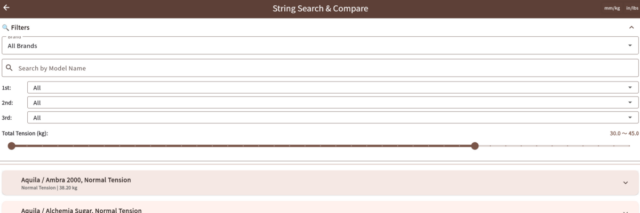
Currently, the tool supports the following filters:
- Manufacturer: Select the manufacturer’s name from a dropdown menu.
- Search by Model Name: Enter a part of the model name to narrow down the list to matching strings.
- 1st/2nd/3rd String: Filter by the material of the treble strings.
- Total Tension (kg): Filter by the combined tension from the 1st to the 6th string.
If you need other filtering conditions, please contact me through the inquiry form. Additionally, if there are strings missing from the database, let me know via the inquiry form and I will consider adding them.
By combining these filters, you can effectively compare and evaluate different strings.
When you tap a string displayed in the list, its detailed specs will appear as shown below:
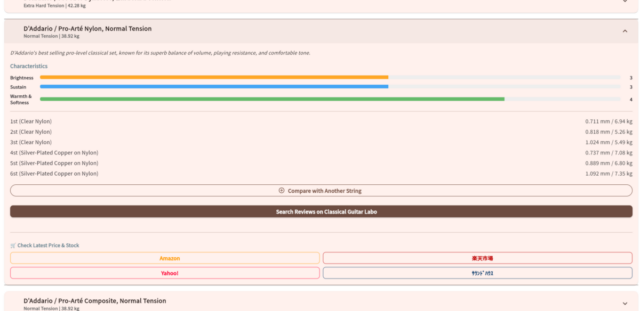
Note: The “Characteristics” are generalized, so please use them merely as a reference.
There is also a unit toggle feature for mm/kg and in/lbs. Please use the button in the top right corner.
Feature 2: Side-by-Side Spec Checking with the Comparison Tray
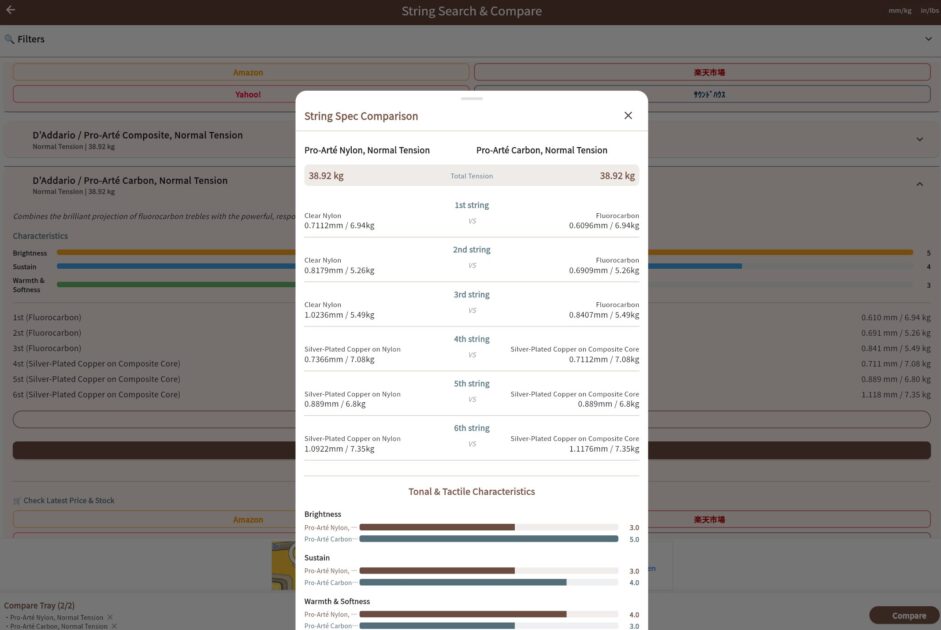
Not only can you filter and search for strings, but you can also compare two strings side-by-side.
This allows you to compare string materials, gauges (thickness), and tensions seamlessly across different manufacturers.
If you tap “Compare with Another String”, which appears when you tap a string’s name, a “Comparison Tray” will pop up at the bottom of the screen:

Select two strings and tap “Compare” in the bottom right to see the side-by-side spec results:
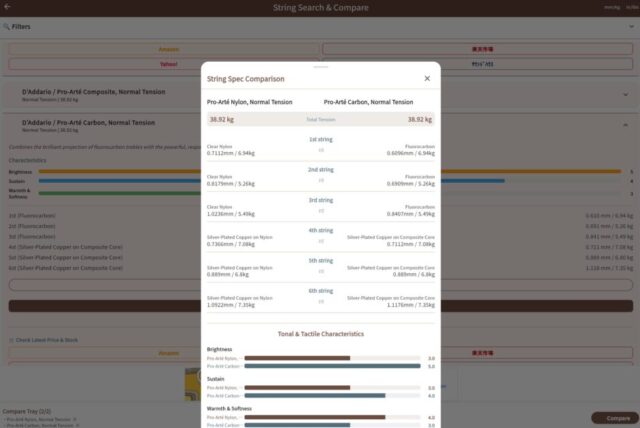
If you want to compare a different string, tap “Remove from Tray” on an already selected string, or tap the “×” next to the string’s name inside the Comparison Tray.
Feature 3: Check Lowest Prices and Navigate to Reviews
At the bottom of each string’s info section, you will find a link to our site’s pillar article (a collection of review articles) alongside purchase links for Amazon, Rakuten Ichiba, Yahoo! Shopping, and Sound House.
Please note that our site does not necessarily have review articles for every single string. Additionally, the links to each online shop are simply the automated search results for that string’s manufacturer and model name. Please verify the actual product and price on your own before purchasing.
Note: This feature is only for Japanese users now.
[Use Cases] Practical Ways to Escape the String-Hunting Rabbit Hole
Here are a few examples of how you can utilize this search and comparison feature:
Use Case 1: Solving the “3rd String Problem”
With classical guitars, the sound of the 3rd string tends to be a bit muddy, and many players opt to use a carbon string exclusively for the 3rd string.
However, carbon strings are thinner and have higher tension than nylon strings, so if you carelessly swap in a random carbon string without thinking, your guitar might become harder to play.
By using the search function to filter for sets where the 3rd string is carbon, and checking the thickness and tension from there, you can make the transition with as little discomfort as possible.
Use Case 2: Finding Your Ideal “Normal Tension”
Classical guitar strings generally have model names like “Normal Tension” or “High Tension” that serve as a rough guide.
However, because there is no unified standard defining how many kilograms constitute which label, the actual tension varies widely from brand to brand.
By using the search function to filter by total tension, you can execute a much more accurate search for your “best tension.”
Please note, however, that the tension values used in this feature are the official figures provided by each manufacturer. Since there is no unified standard for how these official values are measured, they might not be perfectly comparable. Please treat them strictly as a reference.
How to Use the Classical Guitar String Search & Compare Tool (Instant Use, No Login Required)
Using this tool is incredibly simple. If you want to use the tool as a standalone feature, please access the following link:
It’s free and ready to use immediately without logging in.
You can also access it directly from the string replacement history and review logging screen. Just tap “Go to String Search & Compare” at the bottom of the login screen:
Even on the post-login screen, you can access it via the “Search & Compare Strings” button in the bottom right, or the “Search Strings from Database” button.
Please Use It as a Reference for Choosing Strings
I believe a tool that allows you to compare classical guitar strings across manufacturers like this is quite rare. If you use this tool in combination with the string replacement history and review logging features, it is sure to enrich your classical guitar life.
Please give it a try!











コメント