


Recently, I expanded my collection to two guitars, which meant I had to manage string changes for both. Even with one guitar, I struggled to remember exactly when I changed strings or how I felt about them later. Keeping paper logs felt too tedious… That’s why I developed “ReString Logger”. It’s completely free to use, so please feel free to try it out!

You can go to “String Search & Compare” functionality directly by this link.
日本語での解説や詳しい使い方は、ReString Logger 使い方マニュアル(日本語版)をご覧ください。
What is “ReString Logger”?
Strings are a crucial element that determines a classical guitar’s tone, but they are consumables that need periodic replacement.
You don’t change them every day—probably every few weeks or months—which leads to questions like: “When did I change these again?”, “What brand and model are currently on this guitar?”, or “Which strings did I use for that recital a year ago?“
This confusion multiplies if you own multiple guitars.
As my own guitar count reached two, and as the years went by, I realized my memory had reached its limit.
I wanted an app to log string change histories and personal tone reviews, but surprisingly, I couldn’t find a dedicated one for classical guitarists.
So, I decided to build it myself! That’s how “ReString Logger” was born.
How to Use the App
The ReString Logger app is currently available on iPhone/iPad, Windows, and web browsers. The Android version is currently under review by Google and will be available soon.
All data is stored in the cloud, so logging in with the same account allows you to access and sync your data seamlessly across multiple devices, anytime and anywhere.
iPhone/iPad
You can install the App from this link:

Android
You can install the App from this link:

Windows
You can install the App from this link:

Web Browser
You can use the App from this link:

Key Features of “ReString Logger”
Here is what you can do with the app.
1. Smartly Track Your String History
You can securely save the date you installed a new set of strings, along with the brand and model, directly to a cloud database.
Furthermore, you can register your guitars in advance and link each string change to a specific instrument.
You can also record the date you removed the strings, giving you a clear idea of their lifespan for future reference.
Additional Feature: Spare String Registration
You can now record your spare strings along with their purchase dates and notes.
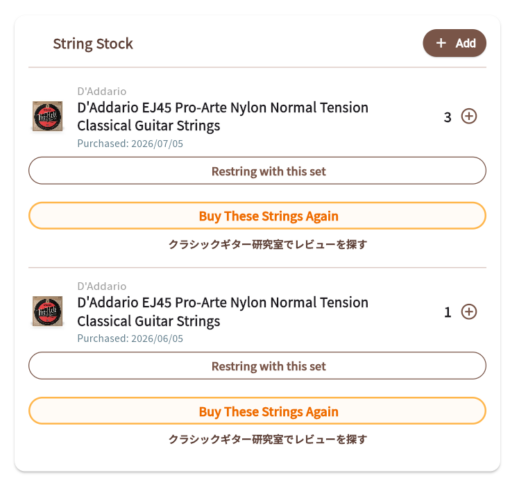
Pressing “Restring with this set” transfers the string from your spares to your active setup, and automatically reduces your stock count.
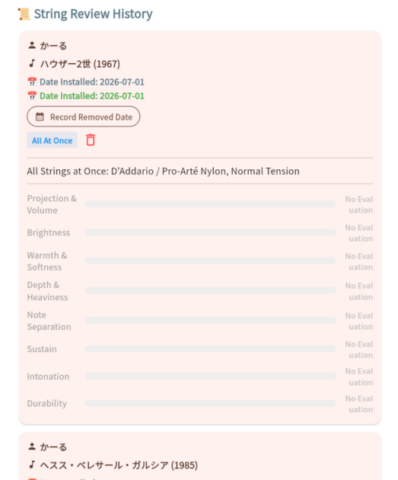
2. Review Strings in Your Own Words
You don’t just log dates; you can also leave detailed tone reviews.
Evaluate parameters like volume, projection, and durability on a 10-point scale, and use the free-text memo field to add notes like “Use this set for the July 2026 recital.”
It will be much easier to recall, “What did those strings sound like?” or “Which set did I use for that competition?”
3. Cross-Device Sync (Cloud Login)
Because your data is securely saved in the cloud, you can access your logs from anywhere, whether you are using a smartphone, tablet, or PC.
In the future, I plan to introduce an opt-in feature where you can view other players’ public reviews to help you discover new strings.
3 Easy Steps! How to Use the App
Using the app is incredibly simple. You can get started in just 3 steps.
Step 1: Account Registration and Login
First, please access the app here:
You will see the following login screen:
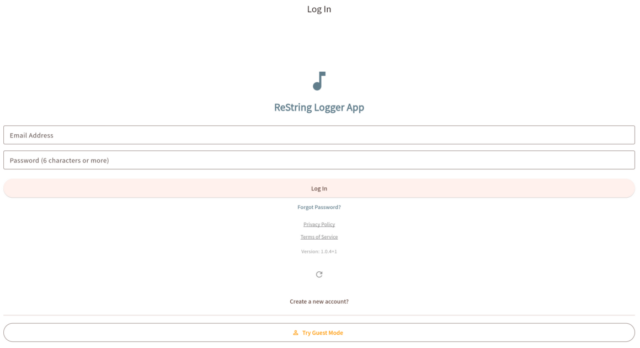
If you just want to test it out, select “Try Guest Mode” at the bottom. (Note: Guest Mode acts as a shared public demo.)
If you want to keep your own private string logs safely synced, select “Create a new account”. This will bring up a screen to enter your Nickname, Email Address, and Password:
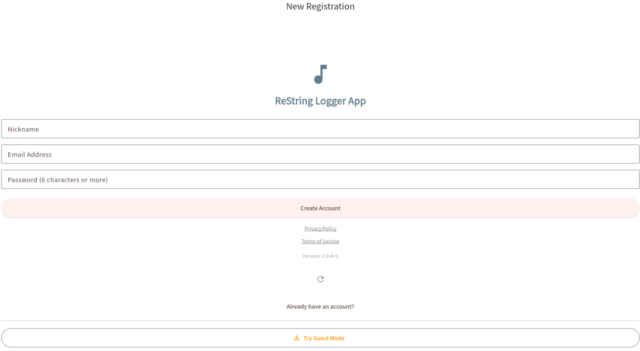
- Nickname: Please note that if you choose to make your logs public in future updates, this name might be visible to others. You can change it later.
- Email Address: Currently, you cannot change this yourself once set. If you need to change it, please contact me via the “Contact” page on this blog.
- Password: Please use at least 6 characters.
Fill in these 3 fields and click “Create Account”. After that, you can safely log in using your email and password.
You can also login with your Google account by Clicking “Sign in with Google”.
Step 2: Register Your Guitars from “My Page”
Once logged in, open “My Page” from the top left menu. Here, you can change your nickname and register the guitars you own.
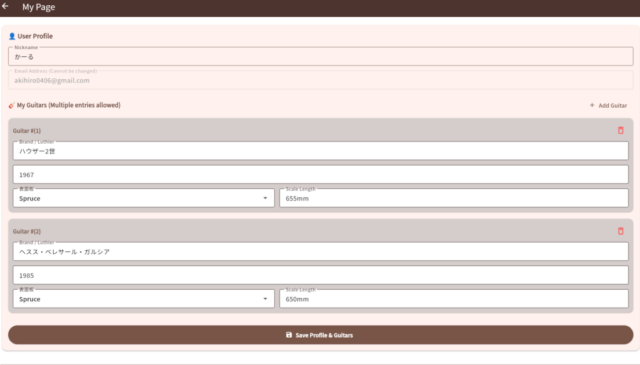
Registering a guitar is optional, but if you own multiple guitars, adding them allows you to link specific string records to each instrument perfectly.
Step 3: Log Your Strings
On the main screen after logging in, select “Register New Strings” to open the registration form:
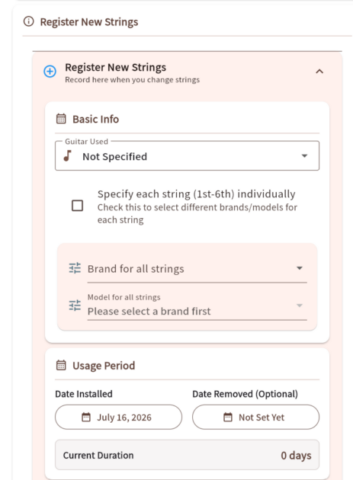
You can input the guitar, brand, model, usage period (dates), your rating/review, and memos. The “Date Removed”, reviews, and memos can be easily updated later.
Strings without a “Date Removed” will be displayed at the top as “Currently Strings”. You can add your final reviews and the removal date when you eventually change them.
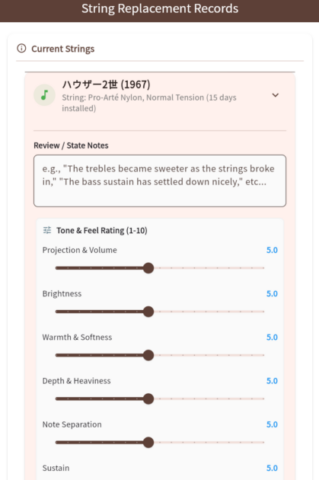
Your logged strings will appear in a chronological list at the bottom of the screen.
Future Updates, Bug Reports, and Requests
I am planning to implement the following features:
- Favorite Strings for Quick Access
- To eliminate the hassle of searching for your go-to strings every time, you will be able to bookmark favorite strings and select them in a single tap.
- iOS & Android Home Screen Widgets
- Check your current strings and tracked days at a glance directly from your device’s home screen without needing to launch the app.
- Advanced Tuner & Defective String Detection
- Introduces a high-precision tuner powered by algorithms tailored specifically for classical guitars, along with a defective string detection feature.
Since this is my very first app and I am a solo developer, there might still be some bugs.
If you find any bugs or have feature requests, please feel free to send them via the Contact form on this blog.
I will also be adding more string brands to the dropdown menu over time. If you have specific requests, let me know, and I’ll prioritize them!

Changelog (ReString Logger)
To ensure the best experience, I regularly update the app with new features and improvements.
- August 27, 2026 (v2.0.54+54)
- String Change Reminders: Local notifications to alert you after a chosen number of days, plus a dedicated settings screen.
- In-App Update Notice: Pop-up dialog to introduce new features when updating the app.
- Public Feed: Community feed to explore other players’ string logs and reviews.
- August 22, 2026 (v1.4 build 43)
- Added guitar photo upload functionality
- Added audio recording and playback for string tone samples
- Expanded details and profile options for “My Guitar”
- August 16, 2026 (v1.3.36)
- Improve UI
- August 11, 2026 (v1.3.11)
- Improved drop-down menus to allow filtering string brand and model names by typing.
- Corrected inaccuracies in the string database.
- Fixed other minor bugs and performance issues.
- August 8, 2026 (v.1.3.10)
- Bug Fixes
- August 7, 2026 (v.1.3.9)
- Add filtering features for String Stock/Review History
- UI Improvement
- August 6, 2026 (v1.3.8)
- Added account deletion feature
- Added support for Apple ID login
- Bug fixes and performance improvements
- August 5, 2026 (v1.3.7)
- Split the string management screen into tabs to reduce vertical scrolling.
- August 4, 2026 (v1.3.6)
- Change the Icon of log-in page to the App Icon
- Assign the shop link to each country instead of all Japanese
- Fix overflow problem
- August 4, 2026 (v1.3.5)
- Add Germany, Spanish, Chinese Translations
- August 3, 2026 (v1.3.4)
- 1. Enhancements to “Active Strings” Cards & UI
- Elapsed days summary for individual strings: When strings were installed on different dates, the elapsed days are now displayed as a range (e.g., “X–Y days passed”) based on the oldest and newest dates.
- “All-at-once” / “Custom Set” badges: Added label tags to the top of the cards to improve the visibility of the set type.
- Accordion (collapsible) view for individual strings: Individual string details (1st to 6th) are now hidden by default, with a toggle to expand or collapse for a cleaner UI.
- Cleanup of delete icons: Removed duplicate delete buttons from the top-right and bottom areas, consolidating them into a single delete button in the bottom action area.
- 2. Introduction of the “Single String Replacement” Feature
- Dedicated dialog for partial replacement: Added a feature to trigger a replacement dialog from the active strings card, allowing users to swap out specific individual strings (1st–6th) using stock or new strings.
- Maintaining review and history tracking per set: Implemented logic to automatically close the usage period (
removedDate) of the old set upon a single-string replacement, and automatically generate a new set record containing the updated configuration (inheriting the remaining 5 strings from the old data). - Automatic memo insertion: Automatically inserts a note in the memo field stating “Replaced [X] string individually (inherited from previous set).”
- 3. Layout & Bug Fixes for the “Add New String” Input Form
- Fixing dropdown text overflow: Resolved text overflow issues in the individual string model dropdown forms.
- Improved readability for long brands/models: Introduced
selectedItemBuilderto keep the input box clean with a single line, while allowing full text wrapping (softWrap: true) when the popup menu is expanded. - “Copy 1st string to all” button: Added an action button in individual specification mode to instantly apply the manufacturer and model selected for the 1st string to strings 2 through 6 with a single tap.
- Fix for Assertion error when switching from Set to Individual mode: Fixed a bug where selection option maps (
_stringModelsOptions) and values (_selectedModelIds) for each string became out of sync when switching modes.
- 4. Bug Fixes for Stock (Spare Strings) Management
- Fix for out-of-stock (0 quantity) sorting & Index errors: Modified the app to perform sorting in memory on the Dart side (“In Stock (>0) -> Out of Stock (0)”) instead of requiring a Firestore composite index.
- 5. Code Safety Enhancements (Async & BuildContext)
- Fix for “deactivated widget’s ancestor is unsafe” warnings: Stored references like
AppLocalizationsandScaffoldMessengerprior to asynchronous operations (such as Firestore add/update/delete) withawait, ensuring safety during screen navigation or dialog dismissal.
- Fix for “deactivated widget’s ancestor is unsafe” warnings: Stored references like
- 6. Improvements to English Translations
- 1. Enhancements to “Active Strings” Cards & UI
- August 3, 2026 (v.1.3.3)
- Collapsed review cards by default to improve readability
- Added string package images to the review history on My Page
- Fixed an issue where the “Add Guitar” button was cut off on mobile screens
- Added auto-scrolling to the new input form when tapping “Add Guitar” on My Page
- Updated the login screen color scheme to match the post-login design
- July 29, 2026 (v1.3.2)
- String Search & Compare now supports sets with unknown total tension
- Added new string manufacturers to the database: Yamaha, Winner
- Added new strings to the database, including Knobloch AEQUUS
- July 27, 2026 (v1.3.1)
- Clicking a string name on the String History screen now displays that string’s data on the String Search & Comparison screen.
- July 26, 2026 (v1.3.0)
- Added string registration feature
- Expanded filter options for string search and comparison
- Added sorting (by name, etc.) to string search and comparison
- July 25, 2026 (v1.2.0)
- Add many strings(total 500+)
- Show the package image of each string
- July 24, 2026 (v1.1.3)
- Make the user ID of Guest User common
- July 23, 2026 (v1.1.2)
- Improve the review edit feature
- July 23, 2026 (v1.1.1)
- English Translation of “String Search & Compare” tool is now available: this link
- Improve the response of “String Search & Compare” tool
- July 22, 2026 (v1.1.0)
- Add “String Search & Compare” functionality
- English Translation is on-going
- Add many string manufacturer
- Add “String Search & Compare” functionality
- July 18, 2026 (v1.0.5)
- Add “Sign in with Google” option
- Bug Fix: Users couldn’t register their new guitar due to database permission problem
- July 16, 2026 (v1.0.4)
- Added English language support. The app will now automatically display in English if your device’s language is set to anything other than Japanese.
- Added “Visibility Settings” (Make Public) options to the My Page and string log screens.
- July 15, 2026 (v1.0.3)
- Version info is now displayed on the login and string log screens.
- July 13, 2026 (v1.0.0)
- [Initial Release] “ReString Logger” is officially live.











コメント